If your AI agents are making mistakes and burning through API tokens, you are missing a structured skill architecture. Here is how to build it using Identity, Router, and Knowledge layers.
If you struggle with AI agent skills, you are not alone. When I show how my Agentic OS runs without mistakes, the first question I get is: "What are these skills exactly, and how do they work?"
Most builders look for a magic prompt. The secret is not a single, giant prompt - it is a structured, three-layer skill architecture. By separating who the agent is, what it does, and what it needs to know, you keep the agent focused, fast, and token-efficient.
Here is the exact three-layer architecture I run on my system every day.
1. The Identity Layer
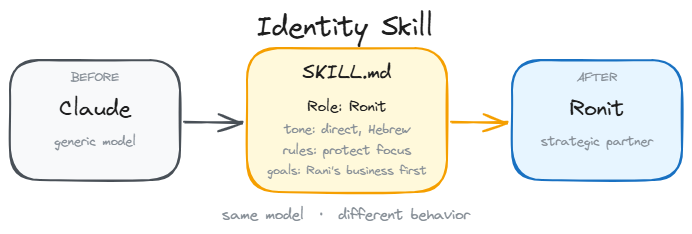
The first layer defines who the agent is in every single session. It does not contain tools or workflow instructions. Instead, it defines values, tone of voice, business context, and strict rules for what the agent must never do.
In my local setup, this lives in two files: CLAUDE.md (which loads automatically) and ronit-master-skill/SKILL.md (which defines my brand narrative and business relationships).
Without this layer, your agent behaves like a temp worker who shows up every morning forgetting who they work for, what the brand stands for, or how you like things done. The Identity Layer is the system anchor.
2. The Router Layer
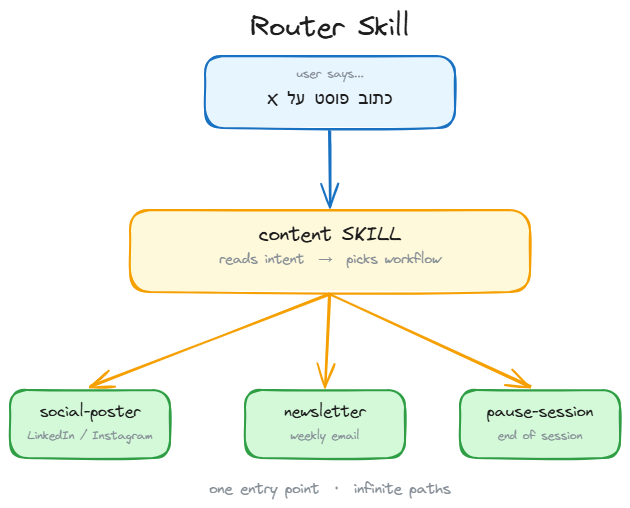
The second layer consists of Router documents. A router document is not a massive instruction set - it is a trigger. It loads the exact context for a specific task at the exact moment you need it.
For example, when I type /newsletter in my terminal, the agent does not load my entire business database. It loads only the context needed to draft, format, and test an email. When I run /social-poster, it loads a completely different context optimized for LinkedIn and Instagram.
This is critical for token efficiency. In my system, a router loads 200 lines of focused context instead of carrying 2,000 lines of everything. The agent runs sharper, faster, and cheaper. Even smaller models perform like frontier brains when their context is clean.
3. The Knowledge Layer
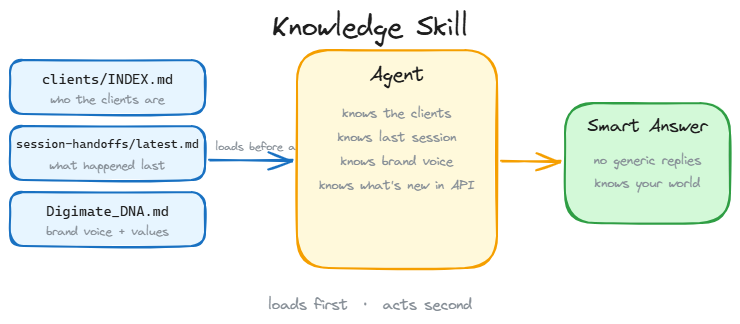
The third layer contains Knowledge documents. These are the files that prevent your agent from guessing. If you ask an agent to write a quote and it does not have your pricing sheet, it will make up numbers.
Knowledge files are persistent reference documents that sit in a local wiki. They include client details, tool documentations, competitor research, and pricing lists.
For instance, my Mailcoach knowledge document contains API endpoints, segment logic, and warning flags. When the newsletter router runs, it queries this file to make sure it uses the correct API parameters. The agent builds expertise over time, saving you from repeating the same instructions.
The Key For Independency !
Because this three-layer system is built using local Markdown files and simple scripts, it is model-agnostic. If a faster or cheaper model is released tomorrow, I do not rewrite my business logic. I simply change the execution brain.
The identity files, the workflows, the local scripts, and the approval gates remain identical. Stop trying to build custom API agents that break with every API update. Start building the local operating system that runs them.